The most common data quality “framework” I meet is a page in a wiki. It lists sensible rules: customer ID is mandatory, amounts can’t be negative, dates can’t be in the future. Nothing in the pipeline reads it. Six months later a bad load reaches a dashboard, someone asks why the rules didn’t catch it, and the honest answer is that they were never rules, only intentions.
I’ve worked on Medallion lakehouses on both Azure Databricks and Microsoft Fabric, and the pattern holds on both: a rule gets enforced when it’s code, sits in a defined place in the pipeline, has a defined outcome for bad data, writes its result somewhere visible and has a named owner. This post is the playbook I use for lakehouse data quality checks, built around one decision table and one code pattern. If you want the layer conventions first, my Medallion architecture design tips cover them.
Product behaviour described here reflects Databricks and Microsoft Fabric documentation (Microsoft Learn) as of October 2026. Check the linked docs before relying on any detail.
Why rules in documents don’t get enforced
A rule in a document fails in four predictable ways:
- No runtime. Nothing executes it, so a violation is discovered by a person, late.
- No defined outcome. “Amounts must be positive” doesn’t say what happens to a row with a negative amount. Drop it? Fix it? Stop the load? Without an answer, engineers improvise differently in every pipeline.
- No memory. Even when a check runs, the result vanishes into a log, so nobody can tell whether quality is improving or decaying.
- No owner. A failing rule with nobody assigned to it is just noise, and noise gets muted.
The rest of this post closes those four gaps.
The six check types
I group rules into six types. Each fails differently and belongs in a different place.
- Schema: the expected columns and types are present. Catches upstream changes.
- Completeness: required values aren’t null, and the volume of data is plausible.
- Uniqueness: a business key appears once at the declared grain.
- Validity: values fall in an allowed range, domain or format.
- Referential: keys point at rows that exist, such as an order’s customer ID in the customer dimension.
- Freshness: data arrived and was refreshed within the agreed window.
Which layer each check belongs in
The principle: bronze preserves, silver cleans, gold guarantees. The Fabric Medallion guidance describes bronze as data stored exactly as it arrives, silver as fixed errors, standard formats and removed duplicates, and gold as curated for reporting. Checks follow the same logic. Rejecting data at bronze destroys your source of truth, so bronze checks measure and alert but rarely reject. Silver is where row-level rules live. Gold is where you stop bad data reaching consumers.
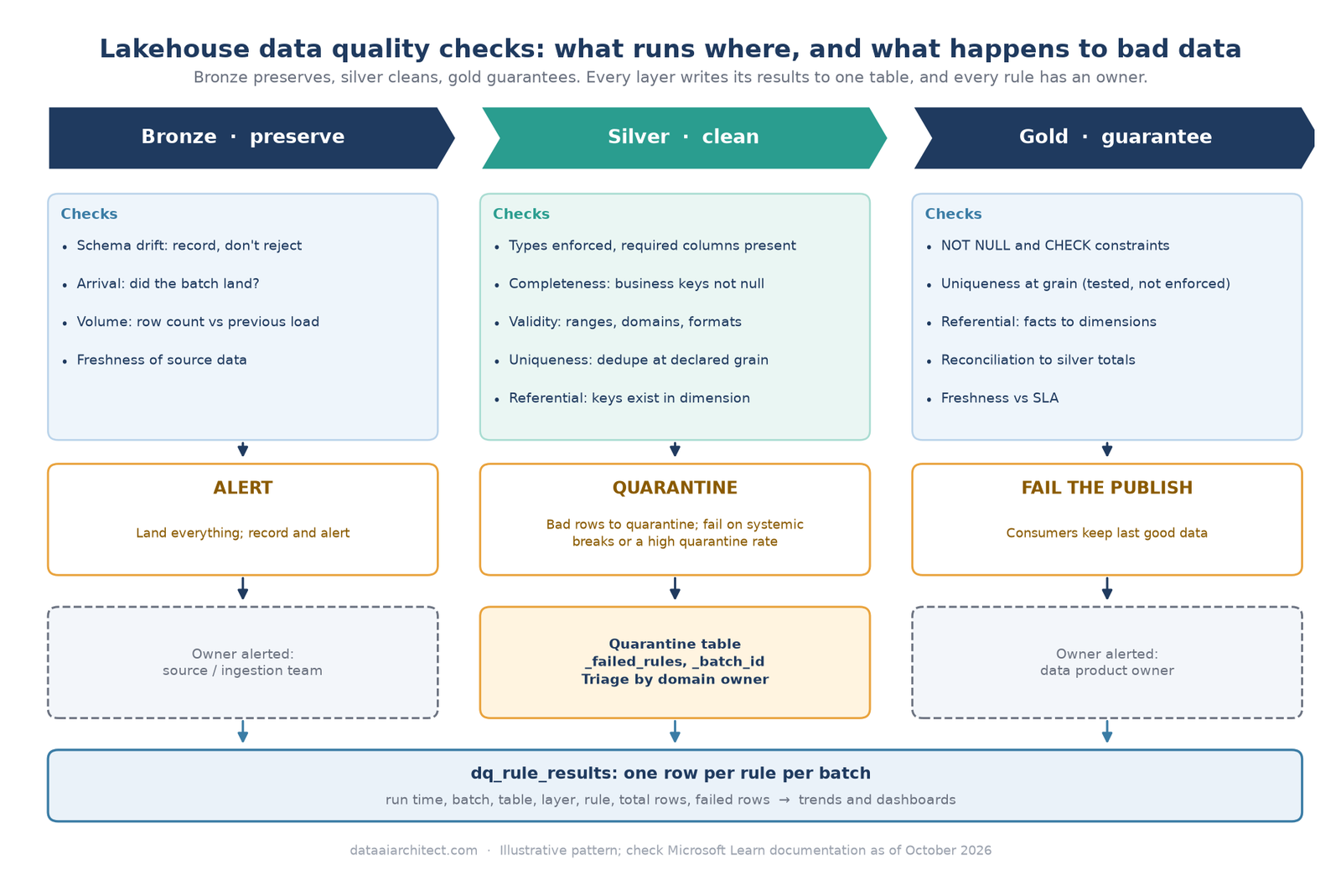
The decision table
This is the table I put in front of teams. Each cell is the default action for that check in that layer; “–” means I don’t normally run it there.
| Check | Bronze | Silver | Gold |
|---|---|---|---|
| Schema | Record drift and alert; fail only if the data can’t be read | Enforce types; fail if a required column is missing | – (already enforced upstream) |
| Completeness | Row-count and arrival check vs previous load: alert | Null business keys: quarantine. Null rate over threshold: fail | NOT NULL on key columns: fail |
| Uniqueness | – | Exact duplicates: drop (and count). Conflicting duplicates: quarantine | Duplicate at the declared grain: fail |
| Validity | – | Out-of-range, bad domain or format: quarantine | CHECK constraints on critical measures: fail |
| Referential | – | Orphan keys: quarantine, or keep with an “unknown” member if late-arriving dimensions are expected | Fact-to-dimension orphans: fail, or alert if you’ve agreed an unknown-member rule |
| Freshness | Late or missing source data: alert | Stale input: hold the run | Stale table vs SLA: alert, and keep serving last good data |
Two notes on gold. First, Databricks primary key, foreign key and unique constraints are informational only and aren’t enforced, while NOT NULL and CHECK constraints are enforced and fail the transaction on violation (constraints docs). So uniqueness and referential integrity at gold need a test you write yourself. Second, gold is where “fail” means “don’t publish”, not “delete”: consumers keep seeing yesterday’s good data while you fix today’s.
Drop, quarantine or fail?
These three outcomes get confused, so I use explicit rules.
Drop a row only when it’s provably worthless and reproducible from bronze: exact duplicates, known test records, junk rows. Always count what you drop; an uncounted drop is silent data loss.
Quarantine when the defect is in individual rows and the rest of the batch is fine. Invalid values, missing keys and orphans belong here. The row goes to a quarantine table with the reason attached, the clean rows carry on, and someone can fix and replay the rest later.
Fail when the problem is systemic or the cost of wrong data exceeds the cost of late data: a schema break, an empty batch, a freshness breach, a key violation in a table feeding finance or regulatory reporting.
My favourite refinement is a circuit breaker between the first two. If more than a set share of a batch lands in quarantine (I start around 5% and tune per table), fail the run instead. A quarantine rate of 40% isn’t a few bad rows; it’s an upstream incident, and quarantining it quietly just hides it.
A PySpark quarantine pattern
The pattern works on Databricks and in Fabric notebooks, because it uses only standard DataFrame functions and Delta tables. Rules are a dictionary of pass conditions, so adding one is a one-line change. A NULL result counts as a failure, which stops nulls slipping past comparisons like amount >= 0.
from datetime import datetime, timezone
from pyspark.sql import DataFrame, functions as F

RULES = {  # each condition is True when the row PASSES
    "order_id_not_null":   F.col("order_id").isNotNull(),
    "amount_not_null":     F.col("amount").isNotNull(),
    "amount_non_negative": F.col("amount") >= 0,
    "status_in_domain":    F.col("status").isin("NEW", "PAID", "SHIPPED", "CANCELLED"),
}

def flag_rows(df: DataFrame, rules: dict) -> DataFrame:
    """Add _failed_rules: the names of the rules each row failed (empty array = clean)."""
    failures = [F.when(~F.coalesce(cond, F.lit(False)), F.lit(name)) for name, cond in rules.items()]
    return df.withColumn("_failed_rules", F.filter(F.array(*failures), lambda x: x.isNotNull()))
The second half measures the batch, applies the circuit breaker, splits the rows and records the result. Table names are placeholders; in a schema-enabled Fabric lakehouse, use schema.table rather than three-part names.
MAX_QUARANTINE_RATE = 0.05
batch_id = "2026-10-28T06:00"            # pass in from your orchestrator
run_ts = datetime.now(timezone.utc)

flagged = flag_rows(spark.table("dev_sales.bronze.orders"), RULES)

# One pass: total rows plus failures per rule
stats = flagged.agg(
    F.count("*").alias("total_rows"),
    *[F.sum(F.when(F.array_contains("_failed_rules", n), 1).otherwise(0)).alias(n) for n in RULES],
).first()

# Record results first, so a failed run is still visible in the trend
results = [(run_ts, batch_id, "silver.orders", "silver", n, stats["total_rows"], int(stats[n] or 0))
           for n in RULES]
(spark.createDataFrame(results, "run_ts timestamp, batch_id string, table_name string, layer string, "
                                "rule_name string, total_rows long, failed_rows long")
      .write.format("delta").mode("append").saveAsTable("dev_sales.governance.dq_rule_results"))

bad = flagged.filter(F.size("_failed_rules") > 0)
if stats["total_rows"] and bad.count() / stats["total_rows"] > MAX_QUARANTINE_RATE:
    raise RuntimeError(f"Batch {batch_id}: quarantine rate over {MAX_QUARANTINE_RATE:.0%}, failing")

(flagged.filter(F.size("_failed_rules") == 0).drop("_failed_rules")
        .write.format("delta").mode("append").saveAsTable("dev_sales.silver.orders"))
(bad.withColumn("_batch_id", F.lit(batch_id)).withColumn("_quarantined_at", F.lit(run_ts))
    .write.format("delta").mode("append").saveAsTable("dev_sales.silver.orders_quarantine"))
Caveats: I append for brevity, but a real silver table would MERGE on the business key and make reruns idempotent so replaying a batch doesn’t duplicate rows. The flagged DataFrame is evaluated more than once, which is fine for modest batches; persist it if reading the source is expensive. And this covers row-level rules only. Uniqueness and referential checks need a window or join step before the same split.
If you use declarative pipelines
Lakeflow Declarative Pipelines has this idea built in as expectations: a named SQL condition on a dataset with one of three actions, warn (keep the row and record the metric), drop, or fail the update. Quarantine isn’t a built-in action. Databricks documents it as a pattern you build yourself, much like the one above. Fabric’s materialized lake views similarly support data quality constraints as data moves between layers. I’ll cover expectations in depth in a later post; the decision rules here apply either way.
Recording results so trends are visible
The dq_rule_results table above is the most important part of the pattern. Each batch writes one row per rule: when, which batch, which table and layer, how many rows, how many failed. That makes trends trivial:
SELECT date(run_ts) AS run_date, table_name, rule_name,
       SUM(failed_rows) / SUM(total_rows) AS failure_rate
FROM dev_sales.governance.dq_rule_results
GROUP BY ALL
ORDER BY run_date DESC, failure_rate DESC;
One failing batch is an incident. A failure rate creeping up over three weeks is a conversation with the source team, and you only have that conversation if the history exists. Put a dashboard on the table and review it regularly, not only when something breaks.
Ownership: who gets alerted, who fixes
Every rule needs two names: who is alerted and who fixes. They’re often different people.
- Source and ingestion rules (schema, arrival, volume): the source or ingestion owner.
- Pipeline rules (types, dedupe logic, referential joins): the data engineering team that owns the pipeline.
- Business rules (valid statuses, sensible ranges): the domain owner, who also triages the quarantine table.
Route by severity too. A failed run alerts whoever is on call. A rising quarantine rate raises a ticket against the rule’s owner. Trends go to the periodic review. Store owners in the same governed place as the rules, ideally as groups rather than individuals, the way I do for table ownership in my Unity Catalog migration runbook. Set an expectation for quarantine triage too: a quarantine table nobody reads is just a slower way to drop rows. If you split environments the way I describe in my Fabric workspace structure post, prove new rules in dev and test against realistic data before they can fail a production run.
A starter rule set for a new table
When a new table arrives, I don’t write fifty rules. I start with these:
- Schema recorded at bronze, with an alert on drift.
- Arrival and volume check: did the batch arrive, and is the row count in a plausible range?
- Business key not null at silver: quarantine.
- Business key unique at the declared grain: drop exact duplicates, quarantine conflicts, and test at gold.
- Two or three validity rules on the columns people actually use.
- One referential check on the most important foreign key, with an agreed unknown-member rule.
- A freshness SLA with a named alert recipient.
- A quarantine table and a results table, each with an owner.
Then add one rule per incident. A rule that exists because something really broke gets enforced, because everyone remembers why.
Key takeaways
- A rule gets enforced when it has code, a place in the pipeline, a defined outcome, a recorded result and an owner.
- Bronze preserves, silver cleans, gold guarantees. Reject at bronze almost never.
- Drop only what’s reproducible and worthless, quarantine row-level defects, and fail on systemic problems or where wrong data is costlier than late data.
- Add a circuit breaker: a high quarantine rate should fail the run.
- Write every result to a table, so trends are visible.
- Unique and foreign key constraints on Databricks are informational, so test those yourself.
Keep reading
- Medallion Architecture Done Right: 7 Design Tips
- Migrating from Hive Metastore to Unity Catalog: A Practitioner’s Runbook
- How I Structure Microsoft Fabric Workspaces for Dev, Test and Prod
Using a different split between drop, quarantine and fail? I’d be glad to compare notes. Leave a comment or get in touch.
Sources
- Microsoft Learn: Manage data quality with pipeline expectations
- Microsoft Learn: Constraints on Azure Databricks
- Microsoft Learn: Implement medallion lakehouse architecture in Fabric
Views on this site are my own and don’t represent my employer. This post is for general information only; see the Disclaimer.
Leave a Reply