Your Microsoft Fabric workspace structure takes seconds to create, but changing it once dozens of pipelines, semantic models and reports depend on it is a project in its own right. That’s why, on the AI-ready Fabric platform I’m building today, I treat workspace design as one of the very first decisions, made before anyone creates a lakehouse.
In my Microsoft Fabric lakehouse tips I said I design workspaces around lifecycle and ownership. This post goes deeper: the options I considered, the layout I use, the naming conventions, how workspaces map to capacities and security groups, and how changes move from dev to production. It also covers when this approach is overkill.
Feature behaviour described here reflects Microsoft Learn documentation as of October 2026. Fabric changes monthly, so check the linked docs before you rely on any detail.
Why workspace design is the decision that’s hardest to undo
A Fabric workspace isn’t just a folder. It’s the boundary for almost everything that matters operationally:
- Security. Workspaces divide OneLake into separate containers that can be secured independently, and access is granted through four workspace roles: Admin, Member, Contributor and Viewer.
- Cost and performance. Each workspace is assigned to a capacity, so the workspace decides whose compute your workload consumes.
- Lifecycle. Git integration works at workspace level, and Microsoft’s guidance notes that a workspace can only be connected to a single branch at a time. Each stage of a deployment pipeline is also a workspace.
- Ownership and discovery. Workspaces, not individual items, are what you assign to domains.
So when you pick a workspace layout, you’re really choosing your security model, cost model and release process at the same time.
Three ways to slice workspaces
I’ve seen three broad patterns. All three can work, but they suit very different situations.
Option 1: One workspace per environment
Everything for the platform lives in analytics-dev, analytics-test and analytics-prod. It’s simple and it’s where most proofs of concept start. The trouble arrives when a second team joins: everyone shares one set of roles, one Git branch and one release cadence, and one team’s half-finished change blocks another team’s release. Workspaces also have a documented limit of 1,000 items, which a busy shared workspace can approach sooner than you’d expect.
Option 2: One workspace per Medallion layer
bronze-prod, silver-prod, gold-prod, and so on. It looks tidy on a diagram and makes layer-level permissions easy. In practice, a single change to one data product often touches a pipeline, a notebook and a table in all three layers, so a release spans three workspaces and three Git connections. Layers are a design concept; they don’t need to be a deployment boundary.
Option 3: One workspace per domain and purpose, per environment
This is what I use. Each business domain gets a data workspace (lakehouses for bronze, silver and gold, plus the notebooks and pipelines that load them) and an analytics workspace (semantic models, reports and data agents). Each exists in dev, test and prod. A small platform workspace holds genuinely shared assets, such as conformed reference data and monitoring.
Microsoft’s own lifecycle management best practices support the core idea: separate workspaces for different teams let each team have different permissions, use different repositories and ship on a different cadence, while most items can still use data across workspaces.
| Per environment | Per layer | Per domain + purpose | |
|---|---|---|---|
| Number of workspaces | Lowest | Medium | Highest |
| Independent team releases | No | No | Yes |
| Least-privilege access | Hard | Layer-level only | Natural |
| One change = one release | Yes | Rarely | Usually |
| Best for | PoC, one small team | Rarely my first choice | Multiple teams or domains |
The layout I use
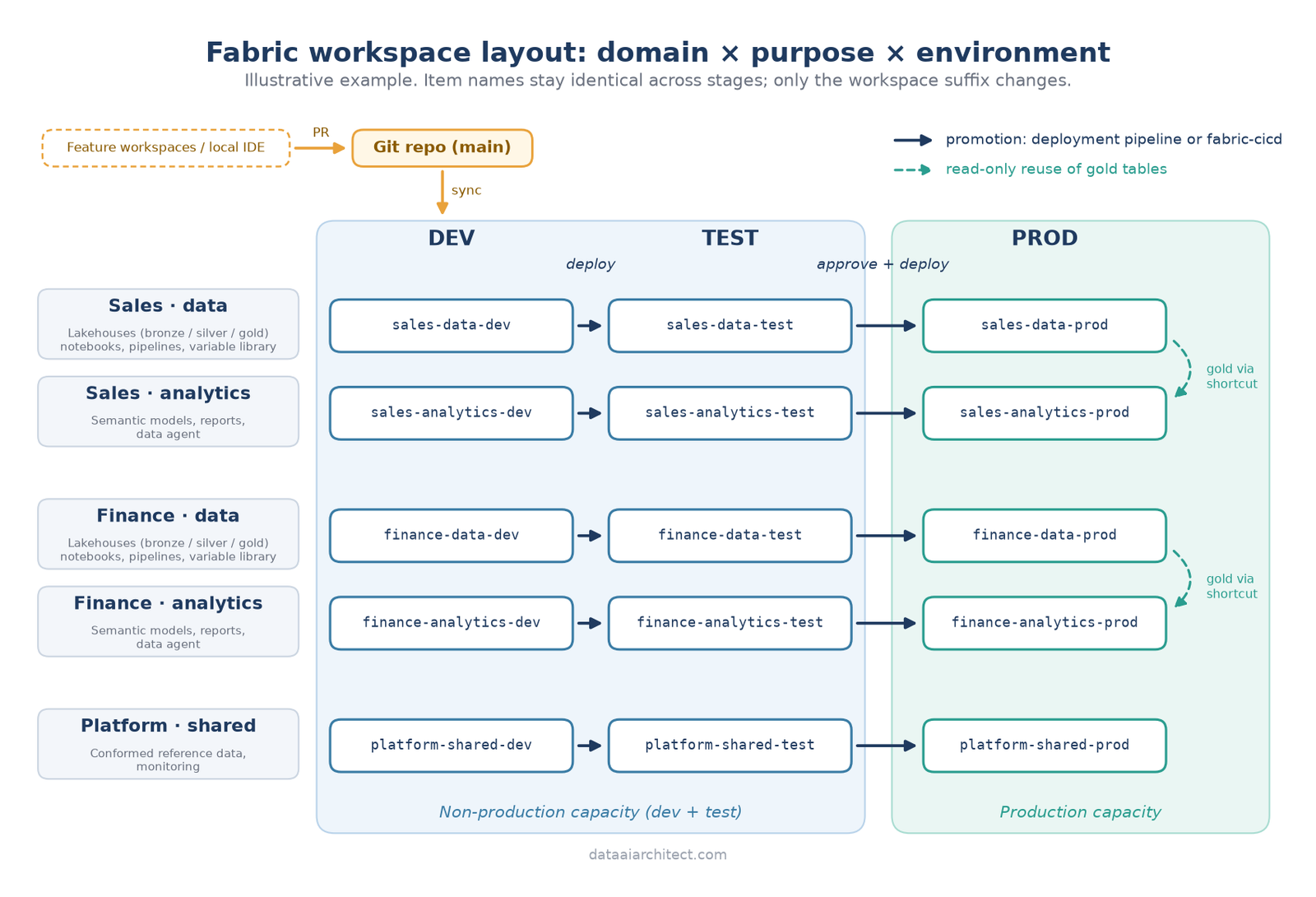
A few points about the diagram:
- Data and analytics are separate on purpose. Engineers and BI developers are often different people with different release rhythms. Splitting the workspaces means a report fix doesn’t wait for a pipeline release, and report authors don’t need write access to lakehouses.
- Analytics reads gold, never silver. The analytics workspace consumes gold tables through OneLake shortcuts, so data isn’t copied and the gold layer is the only contract between the two teams.
- The platform workspace stays small. If it starts collecting domain-specific items, it’s becoming Option 1 again.
- Developers work in isolation. Microsoft recommends an isolated environment for development, either a client tool such as VS Code or Power BI Desktop, or a separate (branched) workspace, before changes are merged through a pull request.
Naming conventions
Naming feels trivial until you’re scripting deployments. Two rules matter most: names must be predictable, and item names must be identical in every environment. Only the workspace name carries the environment.
Workspaces      <domain>-<purpose>-<env>        sales-data-dev, sales-analytics-prod
Capacities      cap-<scope>-<env>                cap-nonprod, cap-prod
Lakehouses      lh_<layer>                       lh_bronze, lh_silver, lh_gold
Notebooks       nb_<layer>_<entity>              nb_silver_customer
Pipelines       pl_<source>_<action>             pl_crm_ingest
Semantic models sm_<subject>                     sm_sales_performance
Reports         rpt_<subject>                    rpt_sales_performance
Variable libs   vl_<scope>                       vl_config
Entra groups    sg-fabric-<workspace>-<role>     sg-fabric-sales-data-prod-viewer
I use lowercase and hyphens for workspaces because they’re easy to type into APIs and scripts, and some special characters aren’t supported in workspace names over the XMLA endpoint.
Mapping workspaces to capacities, groups and roles
Capacities
My default is two capacities: one for dev and test, one for production. A heavy backfill in dev shouldn’t slow down executive dashboards. Microsoft’s guidance is a little more nuanced for test: test should resemble production in data volume, usage and capacity, but load-testing on the production capacity can destabilise it, so they suggest a separate capacity of similar size, ideally one you only pay for while testing. Where budget allows, I follow that for major releases.
Roles
I assign roles to Entra security groups only, never to individuals; the roles documentation confirms you can assign security groups, Microsoft 365 groups and distribution lists.
| Workspace | Dev | Test | Prod |
|---|---|---|---|
*-data-* | Engineers: Contributor | Engineers: Viewer; testers: Viewer | Deployment identity: Admin; support: Viewer |
*-analytics-* | BI developers: Contributor | Testers: Viewer | Deployment identity: Admin; consumers via app or item sharing |
One detail is worth checking carefully. In the roles table, Viewer can still read lakehouse and warehouse data through the SQL analytics endpoint. That’s why I don’t give business users the Viewer role on a data workspace. They get access through the analytics workspace (an app or shared report) instead.
Only Admins can connect a workspace to Git or create a workspace identity, so I keep the Admin group small. For production connections to Entra-secured sources I prefer a workspace identity over a personal account, because Fabric manages its credentials.
Domains
I assign every workspace to a domain so ownership is visible in the OneLake catalog. But domains organise; they don’t secure. Microsoft’s documentation is explicit that domain assignment doesn’t affect item visibility or access, so never rely on it as a security control.
Promoting changes: Git and deployment pipelines
Microsoft documents several CI/CD workflow options. The two I see most often are:
- Git for dev, deployment pipelines for test and prod. Only the dev workspace is connected to Git; content then moves between workspaces with Fabric deployment pipelines (two to ten stages, three by default). Deployment rules handle stage-specific settings. This suits BI-heavy teams and teams new to DevOps tooling.
- Git as the source of truth for every stage. A pipeline in Azure DevOps or GitHub Actions deploys the same tested commit to test and then, after approval, to prod, typically with the open-source fabric-cicd Python library.
I usually start teams on the first and move to the second once they need approval gates and environment-specific substitution. Either way, keep environment-specific values out of item definitions. A variable library holds one value set per stage, with one active per workspace, and pipelines, notebooks, Dataflows Gen2 and lakehouse shortcuts can consume it.
With fabric-cicd, a parameter.yml file in the repository swaps values per environment at deploy time. Here’s a simplified example that repoints notebooks at the target workspace’s own lh_silver and disables schedules outside production:
find_replace:
  # Default lakehouse ID inside notebook definitions
  - find_value: \#\s*META\s+"default_lakehouse":\s*"([0-9a-fA-F-]{36})"
    replace_value:
      TEST: "$items.Lakehouse.lh_silver.$id"
      PROD: "$items.Lakehouse.lh_silver.$id"
    is_regex: "true"
    item_type: "Notebook"

key_value_replace:
  # Only run schedules in production
  - find_key: $.schedules[?(@.jobType=="Execute")].enabled
    replace_value:
      TEST: false
      PROD: true
    file_path: "**/.schedules"
And the deployment step itself, run by a service principal from the release pipeline:
from azure.identity import DefaultAzureCredential
from fabric_cicd import FabricWorkspace, publish_all_items

workspace = FabricWorkspace(
    workspace_id="<sales-data-prod workspace id>",
    environment="PROD",                  # must match a key in parameter.yml
    repository_directory="./sales-data",
    item_type_in_scope=["Lakehouse", "Notebook", "DataPipeline", "VariableLibrary"],
    token_credential=DefaultAzureCredential(),
)
publish_all_items(workspace)
Treat these as starting points and check the current fabric-cicd documentation, because the library and its supported item types move quickly.
Pitfalls, and when not to do this
- Don’t build nine workspaces for a proof of concept. One domain with dev and prod is enough to start; deployment pipelines need a minimum of two stages. Add test and further domains when a second team or a real release process arrives.
- Don’t create items directly in test or prod. Deployment pipelines pair items between stages. Items that aren’t paired don’t overwrite on deployment; you get a duplicate instead. Everything should arrive by deployment.
- Don’t hard-code GUIDs. Notebook default lakehouses and connection IDs differ per workspace. Use variable libraries, deployment rules or parameterisation from day one.
- Don’t treat a domain as a security boundary. Use workspace roles and OneLake security for access.
- Don’t delete and recreate workspaces casually. When a workspace is permanently deleted, its workspace identity goes with it; restoring a deleted workspace doesn’t restore the identity, and connections relying on it break.
- Don’t split by Medallion layer just for neatness. If one change always spans three workspaces, the boundary is in the wrong place.
- Don’t point dev at full production data. Microsoft recommends separate, smaller development data sources and a test source that’s as close to production as possible.
A checklist before you create workspace number one
- Which domains and teams will own data, and who are the owners?
- Which environments do you need now, and which later?
- How many capacities, and which workspaces go on each?
- What are the naming conventions for workspaces, items and groups?
- Which Entra groups get which role in each workspace?
- Which promotion route: deployment pipelines, fabric-cicd, or both?
- Where do environment-specific values live?
- Which domain does each workspace belong to?
If you can answer these on one page, you’re ready to build.
Key takeaways
- Workspaces are your boundary for security, capacity, Git and deployment, so design them before your first lakehouse.
- Slice by domain and purpose (data vs analytics), then by environment. Medallion layers live inside a workspace, not across workspaces.
- Keep item names identical across environments and put the environment only in the workspace name.
- Grant roles to groups, keep Admin small, and remember that Viewer on a data workspace can read data through the SQL analytics endpoint.
- Start with Git plus deployment pipelines; move to fabric-cicd when you need approvals and parameterisation.
- Scale the structure to your team. A small team can start with far fewer workspaces.
Keep reading
If this was useful, these posts cover the next decisions in the same journey:
- 7 Microsoft Fabric Lakehouse Tips I Wish I’d Known on Day One
- Medallion Architecture Done Right: 7 Design Tips
- Microsoft Fabric vs Azure Databricks in 2026: How to Choose
Structure your workspaces differently? I’d be glad to compare notes. Leave a comment or get in touch.
Sources
- Microsoft Learn: Roles in workspaces in Microsoft Fabric
- Microsoft Learn: Workspaces in Microsoft Fabric and Power BI
- Microsoft Learn: Best practices for lifecycle management in Fabric
- Microsoft Learn: CI/CD workflow options in Fabric
- Microsoft Learn: Overview of Fabric deployment pipelines
- Microsoft Learn: Overview of Fabric Git integration
- Microsoft Learn: Variable library overview
- Microsoft Learn: Domains
- Microsoft Learn: Workspace identity
- fabric-cicd: Documentation and Parameterization
Views on this site are my own and don’t represent my employer. This post is for general information only; see the Disclaimer.

Leave a Reply