Since Direct Lake arrived, I’ve had the same conversation on almost every Fabric project. The data is already in a lakehouse, someone has seen the demo, and the plan is to switch every semantic model to Direct Lake. Sometimes that’s right. Other times the model depends on Power Query steps, a SQL view or a capacity smaller than the data, and the switch makes things slower or breaks them.
The direct lake vs import mode question isn’t about which mode is newest. It’s about where your data is prepared, how fresh it must be, how big it is, how complex the model is and what capacity you’re running on. This is the decision guide I use: a decision tree, a comparison table and the tests I run before changing a model’s storage mode.
Product behaviour described here reflects Microsoft Fabric and Power BI documentation (Microsoft Learn) as of November 2026. Direct Lake is changing quickly, so check the linked docs before relying on any detail.
The three storage modes in plain English
Import copies the data into the semantic model. Queries run against a compressed in-memory copy in the VertiPaq engine, so they’re fast, but data is only as fresh as the last refresh, and each refresh re-reads the source.
DirectQuery keeps no copy. Each visual sends a query to the source database. Data is live, but performance depends on a source that usually isn’t built for a busy report’s burst of aggregate queries.
Direct Lake sits in between. The data stays in Delta tables in OneLake, but queries are still answered by VertiPaq. When a query needs a column, the model loads that column from the Parquet files into memory (Microsoft calls this transcoding). A Direct Lake “refresh” is called framing: it reads the Delta log and points the model at the latest files. According to How Direct Lake works, framing usually takes only a few seconds, because it copies metadata rather than data.
One detail people miss: a Direct Lake model shows the data as of the last successful framing, not necessarily the latest state of the Delta table. By default, the “Keep your Direct Lake data up to date” setting reframes automatically. I often turn it off and frame from the pipeline after the gold load, so users never see a half-loaded batch.
Two kinds of Direct Lake, and why it matters for fallback
- Direct Lake on OneLake reads Delta tables from one or more Fabric items and isn’t tied to the SQL analytics endpoint. It never falls back to DirectQuery. Microsoft recommends it for new models.
- Direct Lake on SQL uses a single item’s SQL analytics endpoint for table discovery and permission checks. When it can’t read a Delta table directly, it falls back to DirectQuery.
Microsoft Learn lists what triggers fallback on Direct Lake on SQL: SQL row-level security, object-level security or dynamic data masking defined at the SQL analytics endpoint; tables based on non-materialised SQL views; a table exceeding a capacity guardrail; or tables that haven’t been framed since they were created or changed. One table over a guardrail prevents Direct Lake for the whole model.
The model’s DirectLakeBehavior property (Direct Lake on SQL only) controls fallback:
- Automatic (the default): queries silently fall back to DirectQuery. Reports keep working, more slowly.
- DirectLakeOnly: queries fail with an error instead. I use this in development so problems surface early.
- DirectQueryOnly: everything runs as DirectQuery, useful for measuring the worst case.
To see which tables are falling back and why, run EVALUATE TABLETRAITS() in DAX query view; the [DirectLakeFallbackInfo] column shows None for tables running in Direct Lake.
On Direct Lake on OneLake, SQL endpoint security isn’t applied (access is checked against OneLake), so put security in the model or OneLake security. And if a table exceeds a guardrail, refresh fails and the model can’t be queried until the tables are back within limits. I prefer that: a loud failure gets fixed.
Guardrails and capacity
Direct Lake needs a Fabric capacity (F SKU). Import and DirectQuery work with any Fabric or Power BI licence. The Direct Lake overview publishes per-SKU guardrails on Parquet files, row groups and rows per table, plus model size and memory. Two examples from that table: F2 to F32 allow 1,000 Parquet files, 1,000 row groups and 300 million rows per table; F64 allows 5,000 files, 5,000 row groups and 1,500 million rows, with 25 GB max memory. Check the full table for your SKU.
Max memory isn’t a hard guardrail. Direct Lake loads only the columns queries need, so OneLake data can exceed capacity memory, but an oversized working set gets paged in and out and slows down. The real capacity question isn’t “how big is my lakehouse?” but “how big are the columns my reports touch?”
Comparison table
| Import | DirectQuery | Direct Lake on OneLake | Direct Lake on SQL | |
|---|---|---|---|---|
| Where data lives | Copy inside the model | Source database | Delta tables in OneLake | Delta tables via one SQL analytics endpoint |
| Query engine | VertiPaq | Source database | VertiPaq | VertiPaq; DirectQuery on fallback |
| Freshness | Last scheduled refresh | Live | Last framing (automatic by default) | Last framing; live on fallback |
| Refresh cost | Full or incremental data copy | None | Metadata only | Metadata only |
| Data prep | Power Query, in the model | In the source | Upstream in Fabric | Upstream in Fabric |
| SQL views as sources | Yes | Yes | No (use materialised lake views) | Yes, but falls back |
| Mix with other modes | Yes | Yes | Yes, with Import (and DirectQuery via XMLA) | No, except a composite model built on top |
| Calculated columns / tables | Yes | Columns yes; tables use Import | Preview, with limits | No |
| Licensing | Any | Any | Fabric capacity | Fabric capacity |
| When a guardrail is exceeded | Not applicable | Not applicable | Refresh fails | Falls back to DirectQuery (if allowed) |
Summarised from the storage mode comparison in the Direct Lake overview.
When Import is still the right answer
Import isn’t legacy, and Microsoft says so too. I reach for it when:
- The model is small or medium, and a daily or hourly refresh is fresh enough.
- The author needs Power Query and can’t change the lakehouse, common for self-service analysts.
- The data isn’t in OneLake, or the source needs an on-premises gateway (Direct Lake supports cloud connections only).
- The model relies heavily on calculated columns, calculated tables or user-defined aggregations.
- There’s no Fabric capacity, or a small one.
DirectQuery earns its place for genuinely live data in a source that can take the load.
Composite models: when mixing modes makes sense
A Direct Lake on OneLake model can include Import tables, which is how I handle the awkward edges. Large facts and shared dimensions stay in Direct Lake; a small budget file or a finance-owned mapping table comes in as Import. Keep Import tables small so refresh stays cheap, and remember related columns must have matching data types.
If you’re still choosing the platform underneath, see my Fabric vs Azure Databricks comparison. Mirrored Azure Databricks catalogs are a supported Direct Lake source.
Shaping Delta tables for Direct Lake
Direct Lake performance is mostly decided in the gold tables. Microsoft’s table maintenance guidance and Direct Lake query performance articles give the levers:
- V-Order. Disabled by default for Spark in new workspaces. For Spark-written tables read by Direct Lake, enable it or use the
readHeavyForPBIresource profile, or apply it withOPTIMIZE table_name VORDER. Warehouse keeps V-Order on by default. - Row groups. Direct Lake generally performs best with row groups of 1 to 16 million rows. Small or uneven row groups mean more segments and slower transcoding.
- Small files. Frequent small batches push files and row groups toward the guardrails. Compact regularly.
- Column cardinality. High-cardinality columns load slower. Split datetimes into date and time and drop unused IDs and free text.
- Partitioning. Only on a low-cardinality column; Microsoft suggests fewer than 100 to 200 distinct values, so month beats date.
- Update pattern. Prefer appends. Overwrites force a full cold reload; appends let incremental framing keep data in memory.
One more reason for clean gold: a duplicate on the one-side of a relationship makes Direct Lake queries fail. That’s where the uniqueness tests from my bronze-to-gold data quality playbook pay off.
A decision tree you can reuse
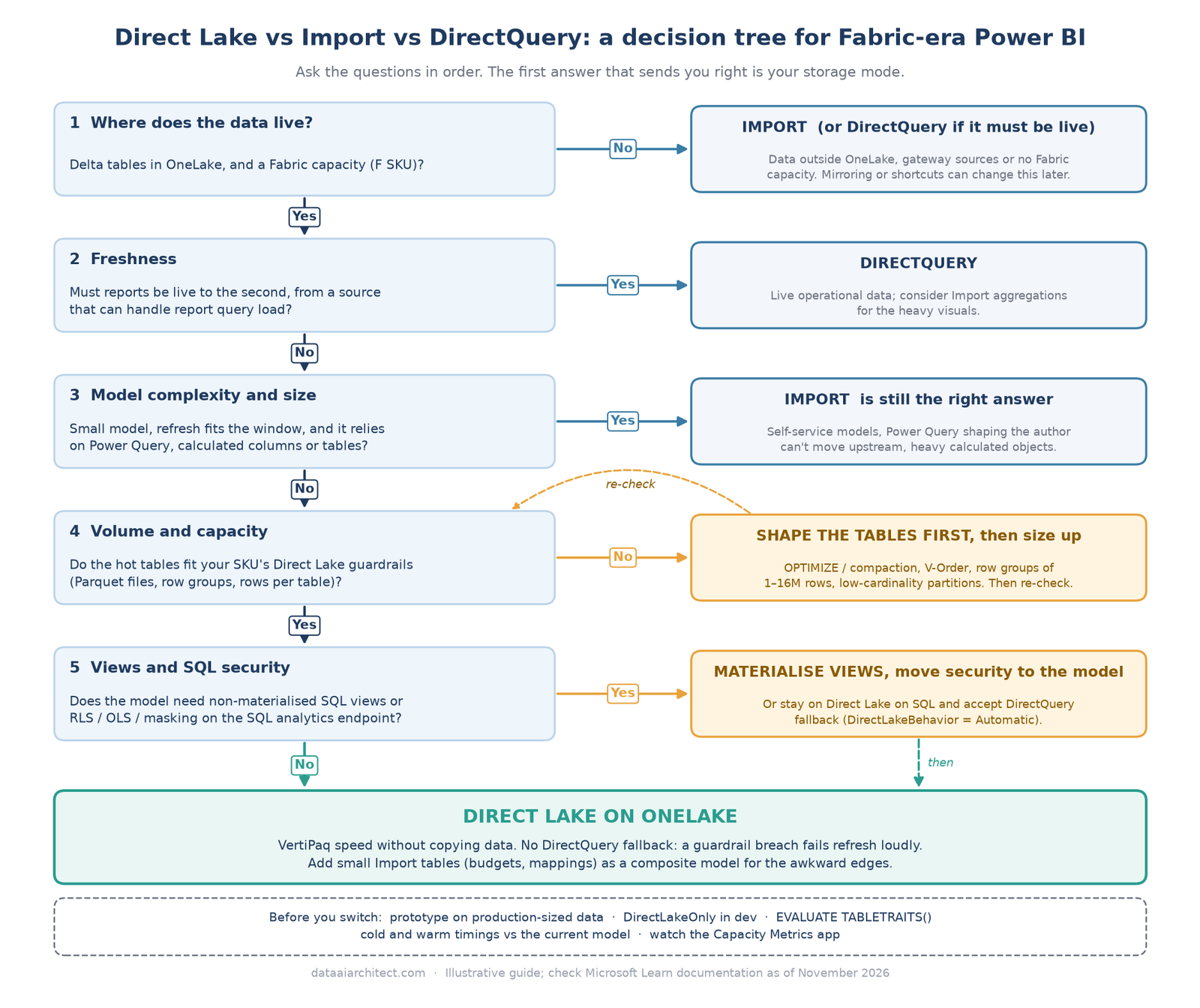
The questions, in order:
- Is the data in OneLake as Delta tables, and is there a Fabric capacity? If not, Import (or DirectQuery for live data).
- Does it need to be live to the second, from a source that can take report load? DirectQuery.
- Is the model small, refreshed comfortably, and dependent on Power Query or calculated objects? Import.
- Do the hot tables fit your SKU’s guardrails, after shaping? If not, optimise the tables, then size up.
- Do you need SQL views or SQL endpoint security? Materialise views and move security into the model, then use Direct Lake on OneLake. Keep Direct Lake on SQL only if you accept fallback for those tables.
Otherwise, Direct Lake on OneLake, with Import tables for the small edges.
How I test before switching modes
I never switch a production model on faith. My sequence:
- Prototype on a copy with production-sized data, as Microsoft also recommends.
- Check the tables against your SKU’s guardrails with Delta Analyzer.
- Set DirectLakeOnly on Direct Lake on SQL models, so fallback errors instead of hiding.
- Run
EVALUATE TABLETRAITS()and confirm every table reportsNonefor fallback. - Measure cold and warm with Performance Analyzer on the busiest pages, against the current model.
- Watch capacity in the Capacity Metrics app under realistic load.
- Promote through test and prod with exit gates, as in my Unity Catalog migration runbook.
Key takeaways
- Import copies data, DirectQuery queries the source, Direct Lake reads Delta tables into VertiPaq on demand.
- Direct Lake on OneLake never falls back; Direct Lake on SQL can, controlled by DirectLakeBehavior.
- Import is still right for small, Power Query-heavy or non-Fabric models.
- Direct Lake speed is earned in the Delta tables.
- Test with DirectLakeOnly and TABLETRAITS before you switch.
Keep reading
- Microsoft Fabric vs Azure Databricks in 2026: How to Choose
- Data Quality Rules That Actually Get Enforced: A Bronze-to-Gold Playbook
- Migrating from Hive Metastore to Unity Catalog: A Practitioner’s Runbook
Drawn the line between Direct Lake and Import somewhere different? I’d be glad to compare notes. Leave a comment or get in touch.
Sources
- Microsoft Learn: Direct Lake overview
- Microsoft Learn: How Direct Lake works
- Microsoft Learn: Understand Direct Lake query performance
- Microsoft Learn: Cross-workload table maintenance and optimization
- Microsoft Learn: Optimize Delta Lake tables with V-Order
Views on this site are my own and don’t represent my employer. This post is for general information only; see the Disclaimer.
Leave a Reply