The first MCP server most data teams build is a single tool called something like run_sql. It takes a query string, runs it with a service account, and returns whatever comes back. The demo works. Then somebody asks what stops the agent reading the HR schema, or returning two million rows into a chat window, or running a DELETE. The honest answer is “nothing”. I’ve reviewed a few of these, and the protocol was never the problem. Tool design was.
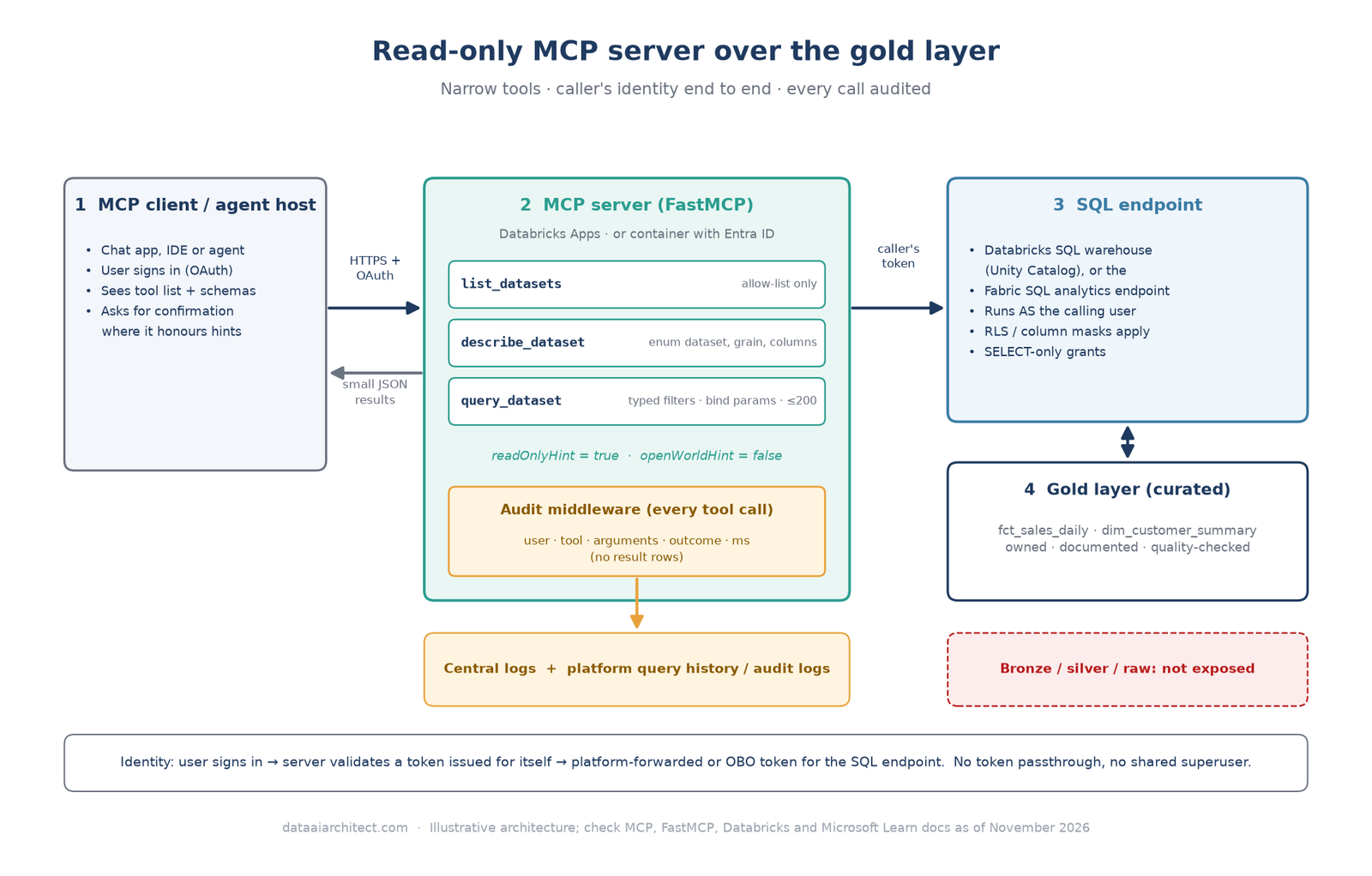
This post walks through how I approach an MCP server for a data platform when the goal is safe, read-only access to curated data. The short version: treat MCP tools like a public API. Make them narrow, read-only and permission-aware, put them over gold tables rather than raw ones, and log every call. There’s a worked FastMCP example in Python that runs against a Databricks SQL warehouse, with notes on the Microsoft Fabric equivalent.
MCP and product behaviour described here reflects the MCP specification (2026-07-28 revision), the FastMCP 4.x documentation, and Databricks and Microsoft Learn documentation as of November 2026. All of these move quickly, so check the linked docs before relying on any detail.
What MCP is, and why tool design is the hard part
The Model Context Protocol is an open protocol that standardises how AI applications (hosts and their clients) connect to servers that expose tools, resources and prompts. A server lists its tools with a name, a description and a JSON Schema for the inputs; the model decides when to call them, and the client sends the call.
The model reads your tool list the way a new developer reads API docs, except it can’t ask follow-up questions. Three things follow:
- The tool surface is the security boundary you control. Whatever a tool can do, a confused or prompt-injected model can eventually ask it to do.
- Descriptions are instructions. Vague descriptions produce vague calls. Precise ones produce precise calls.
- Annotations are hints, not controls. The spec’s
readOnlyHintandopenWorldHinthelp clients decide when to ask for confirmation, but the tools page is explicit that clients must treat them as untrusted unless the server is trusted. Read-only has to be enforced in your code and in the database grants, not declared.
Choosing what to expose: curated gold, not raw data
I only point an MCP server at the gold layer: modelled, documented, quality-checked tables with a named owner. Bronze and silver carry raw identifiers, duplicates and unexplained columns, exactly the context a model will misread.
My selection rules:
- Expose datasets, not schemas. Pick a short list of gold tables or views that answer real questions. Two to five is a good first release.
- Expose metadata alongside data. Grain, column meanings and valid filter values let the model frame a sensible query before it asks for rows.
- Leave out direct identifiers by default. If a use case needs them, that’s a separate server with a separate approval, not a flag on this one.
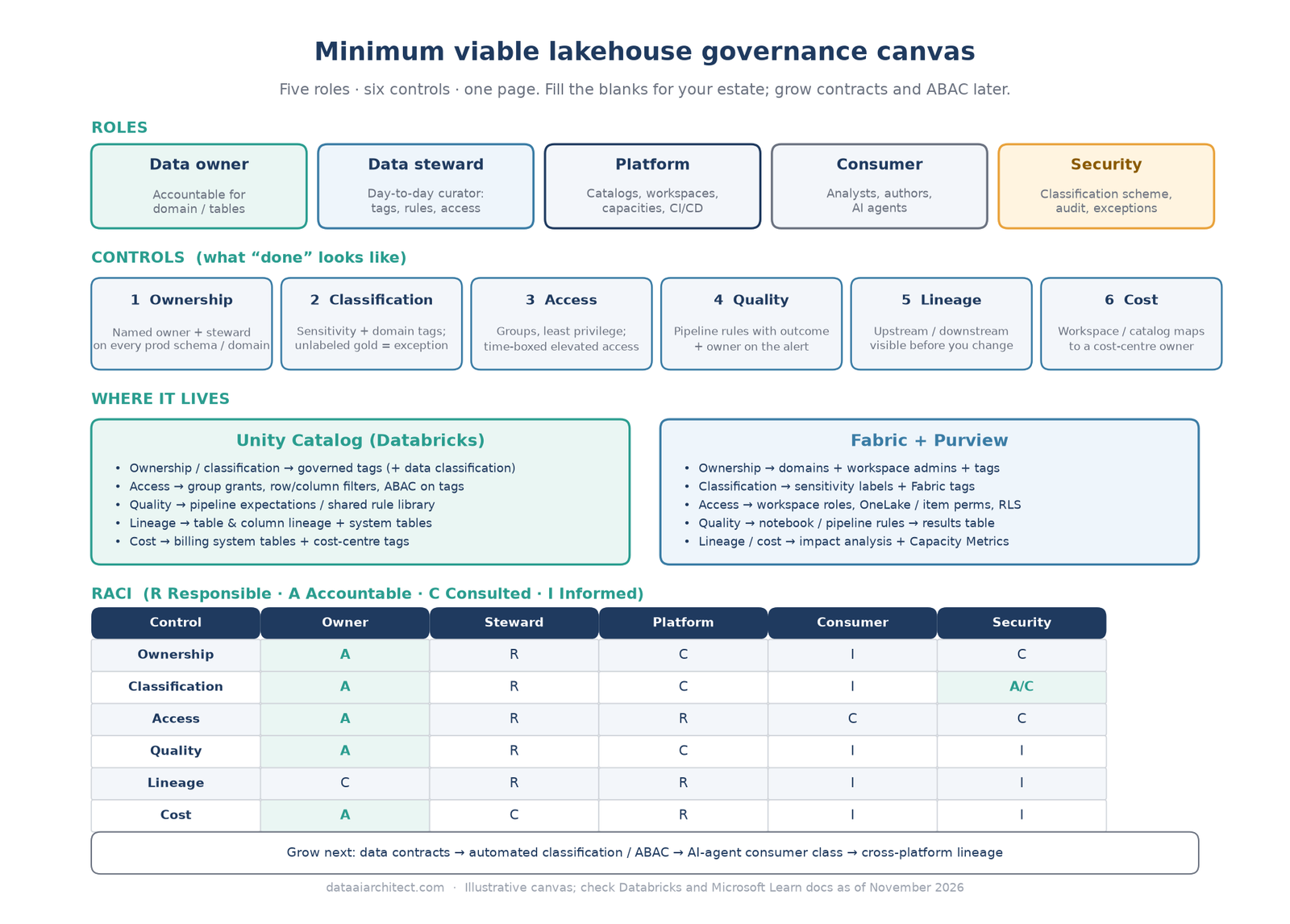
- Only certified, owned tables. If a table has no owner or no quality checks, it isn’t ready to be read by an agent. The ownership and classification controls in my minimum viable governance model are the gate I use.
Designing tools: names, descriptions, parameters and result size
This is where MCP tool design really is API design. A pattern that works well for data:
| Tool | Purpose | Guardrail |
|---|---|---|
list_datasets |
What can I ask about? | Returns the allow-list only |
describe_dataset |
Columns, grain, meaning | Dataset name is an enum, not free text |
query_dataset |
Filtered rows from one dataset | Typed filters, parameterised SQL, hard row cap |
A few rules I apply to every tool:
- Verb-noun names and one job per tool.
query_datasetbeatsdata_tool. Fewer, clearer tools are easier for a model to choose between. - Write the description for the model. Say when to call it, what it returns and what it won’t do (“Call this before query_dataset”, “Returns at most 200 rows”).
- Typed, bounded parameters. Enums for dataset names, dates as dates, string lengths capped, and an integer limit with a maximum. With FastMCP, type hints and Pydantic
Fieldconstraints become the published JSON Schema, and invalid calls are rejected before your code runs. - No free-form SQL in this server. Text-to-SQL has its place, but it belongs behind a different set of controls. Here, table and column names come from the allow-list; only filter values come from the caller, and those go in as bind parameters.
- Small, structured results. Return JSON rows with a count and a “may have more” flag. Large results burn the context window.
The worked example: a read-only gold MCP server in FastMCP
Below is a complete server using FastMCP 4.x and the Databricks SQL Connector for Python. It exposes two gold datasets through three tools, enforces the allow-list and row cap, queries a SQL warehouse as the calling user, and writes an audit record for every tool call. I tested it locally with the warehouse connection mocked; swap in your own table names and environment variables.
# gold_mcp.py - read-only MCP server over curated gold tables (FastMCP 4.x)
import json, logging, os, time
from datetime import date
from typing import Annotated, Literal

from databricks import sql
from fastmcp import FastMCP
from fastmcp.exceptions import ToolError
from fastmcp.server.dependencies import get_http_headers
from fastmcp.server.middleware import Middleware, MiddlewareContext
from pydantic import Field

MAX_ROWS = 200
READ_ONLY = {"readOnlyHint": True, "openWorldHint": False}

# The allow-list IS the contract: dataset name -> fixed table + exposed columns.
DATASETS = {
    "sales_daily": {
        "table": "gold.sales.fct_sales_daily",
        "description": "Net sales by day, region and product category. Grain: 1 row per day/region/category.",
        "columns": ["sales_date", "region", "product_category", "net_sales", "orders"],
    },
    "customer_summary": {
        "table": "gold.customer.dim_customer_summary",
        "description": "One row per active customer: segment, region, tenure. No direct identifiers.",
        "columns": ["customer_key", "segment", "region", "tenure_months", "lifetime_value_band"],
    },
}
DatasetName = Literal["sales_daily", "customer_summary"]

audit = logging.getLogger("gold_mcp.audit")
logging.basicConfig(level=logging.INFO, format="%(message)s")


class AuditMiddleware(Middleware):
    """Log every tool call: who, which tool, which arguments, outcome, duration."""

    async def on_call_tool(self, context: MiddlewareContext, call_next):
        headers = get_http_headers()
        started, outcome = time.perf_counter(), "ok"
        try:
            return await call_next(context)
        except Exception as exc:
            outcome = f"error:{type(exc).__name__}"
            raise
        finally:
            audit.info(json.dumps({
                "event": "mcp_tool_call",
                "tool": context.message.name,
                "arguments": context.message.arguments,
                "user": headers.get("x-forwarded-email", "unknown"),
                "request_id": headers.get("x-request-id"),
                "outcome": outcome,
                "ms": round((time.perf_counter() - started) * 1000),
            }, default=str))


mcp = FastMCP(
    "gold-sales",
    instructions="Read-only access to curated gold sales data. Call list_datasets first, "
                 "then describe_dataset, then query_dataset with filters. Results are capped.",
    middleware=[AuditMiddleware()],
)


def run_query(statement: str, params: dict) -> list[dict]:
    # On Databricks Apps with user authorization, the platform forwards a token for
    # the signed-in user, so Unity Catalog grants, row filters and masks apply.
    user_token = get_http_headers().get("x-forwarded-access-token")
    if not user_token:
        raise ToolError("No user identity on this request; refusing to query.")
    with sql.connect(
        server_hostname=os.environ["DATABRICKS_SERVER_HOSTNAME"],
        http_path=os.environ["DATABRICKS_HTTP_PATH"],
        access_token=user_token,
    ) as conn, conn.cursor() as cur:
        cur.execute(statement, parameters=params)
        cols = [c[0] for c in cur.description]
        return [dict(zip(cols, row)) for row in cur.fetchmany(MAX_ROWS)]


@mcp.tool(annotations=READ_ONLY)
def list_datasets() -> list[dict]:
    """List the curated gold datasets this server exposes, with a one-line description each."""
    return [{"dataset": k, "description": v["description"]} for k, v in DATASETS.items()]


@mcp.tool(annotations=READ_ONLY)
def describe_dataset(dataset: DatasetName) -> dict:
    """Return the columns and grain of one dataset. Call this before query_dataset."""
    d = DATASETS[dataset]
    return {"dataset": dataset, "description": d["description"], "columns": d["columns"]}


@mcp.tool(annotations=READ_ONLY)
def query_dataset(
    dataset: DatasetName,
    region: Annotated[str | None, Field(description="Exact region name, e.g. 'North'", max_length=50)] = None,
    date_from: Annotated[date | None, Field(description="Inclusive start date (sales_daily only)")] = None,
    date_to: Annotated[date | None, Field(description="Inclusive end date (sales_daily only)")] = None,
    limit: Annotated[int, Field(ge=1, le=MAX_ROWS, description="Max rows to return")] = 50,
) -> dict:
    """Read rows from an allow-listed gold dataset with optional filters.
    Returns at most 200 rows. Aggregate in the question, not by pulling everything."""
    d = DATASETS[dataset]
    where, params = [], {}
    if region:
        where.append("region = :region")
        params["region"] = region
    if dataset == "sales_daily":
        if date_from:
            where.append("sales_date >= :date_from")
            params["date_from"] = date_from
        if date_to:
            where.append("sales_date <= :date_to")
            params["date_to"] = date_to
    elif date_from or date_to:
        raise ToolError("date_from/date_to only apply to sales_daily.")
    # Table and column names come from the allow-list, never from the caller.
    statement = f"SELECT {', '.join(d['columns'])} FROM {d['table']}"
    if where:
        statement += " WHERE " + " AND ".join(where)
    statement += f" LIMIT {int(limit)}"  # validated int, 1..MAX_ROWS
    rows = run_query(statement, params)
    return {"dataset": dataset, "row_count": len(rows), "may_have_more": len(rows) == limit, "rows": rows}


if __name__ == "__main__":
    mcp.run(transport="http", host="0.0.0.0", port=int(os.environ.get("DATABRICKS_APP_PORT", "8000")))
What’s doing the work:
DatasetNameis aLiteral, so the schema the client sees is an enum. A call forraw_customersfails validation and never reaches the warehouse.- SQL text is built only from the allow-list. Filter values travel as named parameters (
:region,:date_from), which the connector sends as native query parameters. The limit is a validated integer between 1 and 200. readOnlyHintandopenWorldHintinform clients; the real controls are the fixed SQL shape and the caller’s grants.- The middleware logs tool, arguments, user, request ID, outcome and duration as one JSON line per call.
Authentication, least privilege and RLS pass-through
The most important design choice is whose identity the query runs as. If the server connects with one service principal that can read every gold table, you’ve built a privilege-escalation path: every user of the agent sees what the service principal sees. I want the query to run as the person behind the agent, so the row filters, column masks and grants that already exist in the platform apply unchanged.
There’s a trap here. The MCP authorization spec says servers must only accept tokens issued for themselves, and the security best practices call token passthrough (forwarding the client’s token straight to a downstream API) an anti-pattern. “RLS pass-through” should mean passing the user’s identity, through a proper exchange, not the client’s raw token.
On Databricks, the cleanest route I’ve found is to host the server on Databricks Apps with user authorization. The platform authenticates the user, then forwards a down-scoped token for that user in the x-forwarded-access-token header. Request the sql:restricted-query scope, which the docs describe as “execute read-only SQL queries”, so even the token can’t write. Unity Catalog row filters and column masks then apply to that user’s query. Databricks also documents hosting custom MCP servers on Apps. If all you need is ad hoc SQL for engineers, look at the managed Databricks SQL MCP server first. It permits writes by default, so set disallow_writes in its policy if you use it.
On Microsoft Fabric, the equivalent is an MCP server protected by Entra ID that performs an On-Behalf-Of exchange for a SQL token, then connects to the lakehouse’s SQL analytics endpoint as that user. FastMCP’s Azure provider has a dependency for this:
from fastmcp.server.auth.providers.azure import AzureProvider, EntraOBOToken

SQL_SCOPE = "https://database.windows.net/.default"
auth = AzureProvider(
    client_id=os.environ["ENTRA_CLIENT_ID"],
    client_secret=os.environ["ENTRA_CLIENT_SECRET"],
    tenant_id=os.environ["ENTRA_TENANT_ID"],
    base_url="https://gold-mcp.example.com",
    required_scopes=["mcp-access"],
    additional_authorize_scopes=[SQL_SCOPE],
)
mcp = FastMCP("gold-sales", auth=auth, middleware=[AuditMiddleware()])

@mcp.tool(annotations=READ_ONLY)
def query_dataset(dataset: DatasetName, sql_token: str = EntraOBOToken([SQL_SCOPE])) -> dict:
    ...  # connect to the SQL analytics endpoint with sql_token as the access token
The sql_token parameter is resolved by FastMCP and doesn’t appear in the tool’s schema. Fabric row-level security (security policies with predicate functions) applies to queries on the SQL analytics endpoint and Warehouse, so define RLS there, and keep agent users as workspace Viewers with item-level read rather than Contributors. See Microsoft Entra authentication in Fabric Data Warehouse for connection options.
Either way, grant SELECT on the exposed gold objects only, to groups, not individuals.
Logging and auditing every tool call
An MCP server is a new access path to data, so it needs the same audit story as any other path. I log at two layers:
- Server layer. The middleware above writes one structured record per call: who, which tool, which arguments, outcome and duration. Send it to the same log store as your other platform logs and keep it for as long as your access-audit policy requires.
- Platform layer. Because the query runs as the user, warehouse query history and the platform’s audit logs show the real identity, not a shared service principal. The two layers join on time and user, which is what an investigation needs.
Log arguments, not result rows: copying rows into application logs creates a second, less-protected copy of the data. And review the logs; the questions people actually ask tell you which dataset to add next.
Testing with MCP Inspector and a real client
I test in three passes:
- Unit tests in-process. FastMCP’s
Clientcan connect directly to the server object, so you can assert on schemas, validation errors and generated SQL without a network or a warehouse. - MCP Inspector. Run the server, then
npx @modelcontextprotocol/inspectorfor the web UI, or script it with the CLI:npx @modelcontextprotocol/inspector --cli http://localhost:8000/mcp --method tools/list. Try the unhappy paths on purpose: an unknown dataset, a limit of 5,000, dates on a dataset that has none. Each should fail cleanly with a useful message. - A real client and real users. Connect the agent host your users will actually use, sign in as two people with different row-level access, and ask the same question. If both get the same numbers, your identity isn’t reaching the warehouse.
Hardening checklist before sharing internally
Before I’d let anyone outside the build team point an agent at it:
- Only allow-listed gold datasets; no free-form SQL tool on this server
- Every parameter typed and bounded; hard row cap enforced in code
- Queries run as the calling user via a platform-issued or OBO token; no token passthrough, no shared superuser
- Database grants are
SELECT-only on exposed objects; read-only scope where the platform offers one - RLS and column masks tested with at least two users
- Audit record for every tool call, without result rows, shipped to central logging
- HTTPS only, OAuth required, no anonymous transport in any shared environment
- Error messages helpful to the model but free of stack traces, hostnames and secrets
- Data owner has approved each exposed dataset, and the server has a named owner
- Rate limits or warehouse sizing agreed with the platform team
Key takeaways
- An MCP server for a data platform is an API product: design narrow tools first, then code.
- Expose curated gold datasets and their metadata, never raw layers or free-form SQL by default.
- Enforce read-only in code and grants; annotations only inform the client.
- Run queries as the user through a proper token exchange so existing RLS applies.
- Audit every call, test the unhappy paths in MCP Inspector, and check RLS with two real users.
Keep reading
- A Minimum Viable Data Governance Model for a Lakehouse
- 7 Tips for Building RAG and AI Agents That Hold Up on Enterprise Data
- 7 Unity Catalog Governance Tips from a Large Databricks Programme
Built an MCP server over your own lakehouse, or chosen a managed one instead? I’d be glad to compare notes. Leave a comment or get in touch.
Sources
- Model Context Protocol: Specification (2026-07-28)
- Model Context Protocol: Tools
- Model Context Protocol: Authorization and Security best practices
- Model Context Protocol: MCP Inspector
- FastMCP: Tools, Middleware, Authorization, Azure (Entra ID) integration
- Databricks: Configure authorization in a Databricks app
- Databricks: Host an MCP server on Databricks Apps
- Databricks: Databricks SQL MCP server
- Databricks: Query parameters in the Databricks SQL Connector for Python
- Microsoft Learn: Row-level security in Fabric Data Warehouse
- Microsoft Learn: Microsoft Entra authentication in Fabric Data Warehouse
Views on this site are my own and don’t represent my employer. This post is for general information only; see the Disclaimer.
Leave a Reply